

Multi-factor authentication
Method of computer access control
- 16 min read
- 6 chapters

Learn it on Lably
Usage of MFA has increased in recent years. Security issues which can cause the bypass of MFA are fatigue attacks, phishing and SIM swapping.
Accounts with MFA enabled are significantly less likely to be compromised.
Authentication factors
Authentication takes place when someone tries to log into a computer resource (such as a computer network, device, or application). The resource requires the user to supply the identity by which the user is known to the resource, along with evidence of the authenticity of the user's claim to that identity. Simple authentication requires only one such piece of evidence (factor), typically a password, or occasionally multiple pieces of evidence all of the same type, as with a credit card number and a card verification code (CVC). For additional security, the resource may require more than one factor—multi-factor authentication, or two-factor authentication in cases where exactly two types of evidence are to be supplied.
The use of multiple authentication factors to prove one's identity is based on the premise that an unauthorized actor is unlikely to be able to supply all of the factors required for access. If, in an authentication attempt, at least one of the components is missing or supplied incorrectly, the user's identity is not established with sufficient certainty and access to the asset (e.g., a building, or data) being protected by multi-factor authentication then remains blocked. The authentication factors of a multi-factor authentication scheme may include:
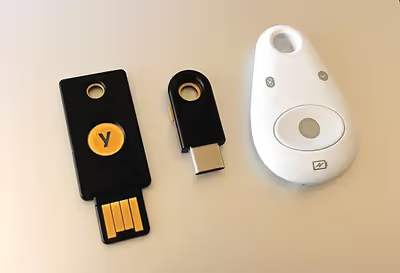
- Something the user has: Any physical object in the possession of the user, such as a security token (possibly shaped like a USB stick), a bank card, a key, a phone that can be reached at a certain number, etc.
- Something the user knows: Certain knowledge only known to the user, such as a password, PIN, PUK, etc.
- Something the user is: Some physical characteristic of the user (biometrics), such as a fingerprint, eye iris, voice, typing speed, pattern in key press intervals, etc.
An example of two-factor authentication is the withdrawing of money from an ATM; only the correct combination of a physically present bank card (something the user possesses) and a PIN (something the user knows) allows the transaction to be carried out. Two other examples are to supplement a user-controlled password with a one-time password (OTP) or code generated or received by an authenticator (e.g. a security token or smartphone) that only the user possesses.
An authenticator app enables two-factor authentication in a different way, by showing a randomly generated and constantly refreshing code, rather than sending an SMS or using another method. This code is a Time-based one-time password (a TOTP), and the authenticator app contains the key material that allows the generation of these codes.
Knowledge
Knowledge factors ("something only the user knows") are a form of authentication. In this form, the user is required to prove knowledge of a secret in order to authenticate.
A password is a secret word or string of characters that is used for user authentication. This is the most commonly used mechanism of authentication. Many multi-factor authentication techniques rely on passwords as one factor of authentication. Variations include both longer ones formed from multiple words (a passphrase) and the shorter, purely numeric, PIN commonly used for ATM access. Traditionally, passwords are expected to be memorized, but can also be written down on a hidden paper or text file.
Possession
Possession factors ("something only the user has") have been used for authentication for centuries, in the form of a key to a lock. The basic principle is that the key embodies a secret that is shared between the lock and the key, and the same principle underlies possession factor authentication in computer systems. A security token is an example of a possession factor.
Disconnected tokens have no connections to the client computer. They typically use a built-in screen to display the generated authentication data, which is manually typed in by the user. This type of token mostly uses a one-time password that can only be used for that specific session.
Connected tokens are devices that are physically connected to the computer to be used. Those devices transmit data automatically. There are a number of different types, including USB tokens, smart cards and wireless tags. Increasingly, FIDO2 capable tokens, supported by the FIDO Alliance and the World Wide Web Consortium (W3C), have become popular, with mainstream browser support beginning in 2015.
A software token (a.k.a. soft token) is a type of two-factor authentication security device that may be used to authorize the use of computer services. Software tokens are stored on a general-purpose electronic device such as a desktop computer, laptop, PDA, or mobile phone and can be duplicated – contrast hardware tokens, where the credentials are stored on a dedicated hardware device and therefore cannot be duplicated, absent physical invasion of the device. A soft token may not be a device the user interacts with. Typically an X.509v3 certificate is loaded onto the device and stored securely to serve this purpose.
Multi-factor authentication can also be applied in physical security systems, where it is typically deployed through the use, firstly, of a physical possession (such as a fob, keycard, or QR-code displayed on a device) which acts as the identification credential, and secondly, a validation of one's identity such as facial biometrics or retinal scan (facial verification or facial authentication), or a PIN.
Inherent
Inherent factors ("something the user is"), are factors associated with the user, and are usually biometric methods, including fingerprint, face, voice, or iris recognition. Behavioral biometrics such as keystroke dynamics can also be used.
Location
Increasingly, a fourth factor is coming into play involving the physical location of the user. While hard wired to the corporate network, a user could be allowed to login using only a pin code, whereas if the user was working remotely, a more secure MFA method such as entering a code from a soft token as well could be required. Adapting the type of MFA method and frequency to a users' location will enable the avoidance of risks common to remote working.
Systems for network admission control work in similar ways where the level of network access can be contingent on the specific network a device is connected to, such as Wi-Fi vs wired connectivity. This also allows a user to move between offices and dynamically receive the same level of network access in each.
Sign in to keep reading
5 more chapters are free with a Lably account.
Mobile phone-based authentication
Two-factor authentication over text message was developed as early as 1996, when AT&T described a system for authorizing transactions based on an exchange of codes over two-way pagers.
Many multi-factor authentication vendors offer mobile phone-based authentication. Some methods include push-based authentication, QR code-based authentication, one-time password authentication (event-based and time-based), and SMS-based verification. SMS-based verification suffers from some security concerns. Phones can be cloned, apps can run on several phones and cell-phone maintenance personnel can read SMS texts. Not least, cell phones can be compromised in general, meaning the phone is no longer something only the user has.
The major drawback of authentication including something the user possesses is that the user must carry around the physical token (the USB stick, the bank card, the key or similar), practically at all times. Loss and theft are risks. Many organizations forbid carrying USB and electronic devices in or out of premises owing to malware and data theft risks, and most important machines do not have USB ports for the same reason. Physical tokens usually do not scale, typically requiring a new token for each new account and system. Procuring and subsequently replacing tokens of this kind involves costs. In addition, there are inherent conflicts and unavoidable trade-offs between usability and security.
Two-step authentication involving mobile phones and smartphones provides an alternative to dedicated physical devices. To authenticate, people can use their personal access codes to the device (i.e. something that only the individual user knows) plus a one-time-valid, dynamic passcode, typically consisting of 4 to 6 digits. The passcode can be sent to their mobile device by SMS or can be generated by a one-time passcode-generator app. In both cases, the advantage of using a mobile phone is that there is no need for an additional dedicated token, as users tend to carry their mobile devices around at all times.
Notwithstanding the popularity of SMS verification, security advocates have publicly criticized SMS verification, and in July 2016, a United States NIST draft guideline proposed deprecating it as a form of authentication. A year later NIST reinstated SMS verification as a valid authentication channel in the finalized guideline.
As early as 2011, Duo Security was offering push notifications for MFA via a mobile app. In 2016 and 2017 respectively, both Google and Apple started offering user two-step authentication with push notifications as an alternative method.
Security of SMS-delivered security tokens fully depends on the mobile operator's operational security and can be easily breached by wiretapping or SIM cloning by national security agencies.
Advantages:
- No additional tokens are necessary because it uses mobile devices that are (usually) carried all the time.
- As they are constantly changed, dynamically generated passcodes are safer to use than fixed (static) log-in information.
- Depending on the solution, passcodes that have been used are automatically replaced in order to ensure that a valid code is always available, transmission/reception problems do not, therefore, prevent logins.
Disadvantages:
- Users may still be susceptible to phishing attacks. An attacker can send a text message that links to a spoofed website that looks identical to the actual website - a Man-in-the-middle attack. The attacker can then get the authentication code, user name and password.
- A mobile phone is not always available—it can be lost, stolen, have a dead battery, or otherwise not work. In particular, lost devices unrelated to a security incident is a major weakness of mass-adoption (in comparison with a lost device and not using MFA.) Answers to solve this weakness often introduce further complexities to MFA adoption.
- Despite their growing popularity, some users may not even own a mobile device, and take umbrage at being required to own one as a condition of using some service on their home PC.
- The SS7 system underlying mobile phone roaming has vulnerabilities, and SMS messages may be redirected to attackers.
- Mobile phone reception is not always available—large areas, particularly outside of towns, lack coverage.
- SIM cloning gives hackers access to mobile phone connections. SIM swap attacks and Social-engineering attacks against mobile-operator companies have resulted in the handing over of duplicate SIM cards to criminals.
- Text messages to mobile phones using SMS are insecure and can be intercepted by IMSI-catchers. Thus third parties can steal and use the token.
- Account recovery typically bypasses mobile-phone two-factor authentication.
- Modern smartphones are used both for receiving email and SMS. So if the phone is lost or stolen and is not protected by a password or biometric, all accounts for which the email is the key can be taken over as the phone can receive the second factor.
- Mobile carriers may charge the user messaging fees.
Legislation and regulation
The Payment Card Industry (PCI) Data Security Standard, requirement 8.3, requires the use of MFA for all remote network access that originates from outside the network to a Card Data Environment (CDE). Beginning with PCI-DSS version 3.2, the use of MFA is required for all administrative access to the CDE, even if the user is within a trusted network.
European Union
The second Payment Services Directive requires "strong customer authentication" on most electronic payments in the European Economic Area since September 14, 2019.
India
In India, the Reserve Bank of India mandated two-factor authentication for all online transactions made using a debit or credit card using either a password or a one-time password sent over SMS. This requirement was removed in 2016 for transactions up to ₹2,000 after opting-in with the issuing bank. Vendors such as Uber have been mandated by the bank to amend their payment processing systems in compliance with this two-factor authentication rollout.
United States
Details for authentication for federal employees and contractors in the U.S. are defined in Homeland Security Presidential Directive 12 (HSPD-12).
IT regulatory standards for access to federal government systems require the use of multi-factor authentication to access sensitive IT resources, for example when logging on to network devices to perform administrative tasks and when accessing any computer using a privileged login.
NIST Special Publication 800-63-3 discusses various forms of two-factor authentication and provides guidance on using them in business processes requiring different levels of assurance.
In 2005, the United States' Federal Financial Institutions Examination Council issued guidance for financial institutions recommending financial institutions conduct risk-based assessments, evaluate customer awareness programs, and develop security measures to reliably authenticate customers remotely accessing online financial services, officially recommending the use of authentication methods that depend on more than one factor (specifically, what a user knows, has, and is) to determine the user's identity. In response to the publication, numerous authentication vendors began improperly promoting challenge-questions, secret images, and other knowledge-based methods as "multi-factor" authentication. Due to the resulting confusion and widespread adoption of such methods, on August 15, 2006, the FFIEC published supplemental guidelines—which state that by definition, a "true" multi-factor authentication system must use distinct instances of the three factors of authentication it had defined, and not just use multiple instances of a single factor.
Security weaknesses
According to proponents, multi-factor authentication could drastically reduce the incidence of online identity theft and other online fraud, because the victim's password would no longer be enough to give a thief permanent access to their information. However, many multi-factor authentication approaches remain vulnerable to phishing, man-in-the-browser, and man-in-the-middle attacks. To counter phishing attacks, users should not share their verification codes with anyone, and many web application providers will place an advisory in an e-mail or SMS containing a code.
In May 2017, O2 Telefónica, a German mobile service provider, confirmed that cybercriminals had exploited SS7 vulnerabilities to bypass SMS based two-step authentication to do unauthorized withdrawals from users' bank accounts. The criminals first infected the account holder's computers in an attempt to steal their bank account credentials and phone numbers. Then the attackers purchased access to a fake telecom provider and set up a redirect for the victim's phone number to a handset controlled by them. Finally, the attackers logged into victims' online bank accounts and requested for the money on the accounts to be withdrawn to accounts owned by the criminals. SMS passcodes were routed to phone numbers controlled by the attackers and the criminals transferred the money out.
Fatigue attack
An increasingly common approach to defeating MFA is to bombard the user with many requests to accept a log-in, until the user eventually succumbs to the volume of requests and by mistake accepts one. This form of social engineering is called multi-factor authentication fatigue attack (also MFA fatigue attack or MFA bombing), and may include other elements, such as calls pretending to be from IT support. When MFA applications are configured to send push notifications to end users, an attacker can send a flood of login attempts in the hope that a user will click on accept at least once.
In 2022, Microsoft deployed a mitigation against MFA fatigue attacks with their authenticator app, by optionally requiring the user to type in a number in addition to clicking "approve".
In September 2022 Uber security was breached by a member of Lapsus$ using a multi-factor fatigue attack. In early 2024, a small percentage of Apple consumers experienced a MFA fatigue attack that was caused by a hacker that bypassed the rate limit and Captcha on Apple’s “Forgot Password” page.
Token Reuse
Token reuse vulnerabilities are an identification and authentication failure in web applications. Token reuse can be identified by testing reuse of old MFA tokens, indicating whether or not the application is invalidating MFA codes. Any auth token given prior to MFA should not have permission to access sensitive resources. Auth tokens should only be provided after MFA verification. Old tokens should be invalidated.
Email verification MFA bypasses
Many web applications bypass authentication when verifying an email address. If the web application does not invalidate the email verification link, the verification link may be usable to bypass the MFA. If the verification token is sent via GET request, it may be saved in the browser's history.
Insufficient rate limiting
MFA requires rate limiting to be secure. Without rate limiting, an attacker can preform an arbitrary number of auth requests attempting different codes until they eventually get access. Even with a rate limit, attackers may try to limit the flow rate of requests to just under the limit threshold with a single thread to maximize the rate of attempts. Alternatively, an attacker may try to bypass the rate limit all together. If the rate limit is tied to a session ID or request token, the attacker may generate new sessions or request tokens to reset the limit. If tied to IP, the attacker may rotate their IP with a tool such as Burp Suite's IP Rotator.
Implementation
Many multi-factor authentication products require users to deploy client software to make multi-factor authentication systems work. Some vendors have created separate installation packages for network login, Web access credentials, and VPN connection credentials. For such products, there may be four or five different software packages to push down to the client PC in order to make use of the token or smart card. This translates to four or five packages on which version control has to be performed, and four or five packages to check for conflicts with business applications. If access can be operated using web pages, it is possible to limit the overheads outlined above to a single application. With other multi-factor authentication technology such as hardware token products, no software must be installed by end-users. Some studies have shown that poorly implemented MFA recovery procedures can introduce new vulnerabilities that attackers may exploit.
There are drawbacks to multi-factor authentication that are keeping many approaches from becoming widespread. Some users have difficulty keeping track of a hardware token or USB plug. Many users do not have the technical skills needed to install a client-side software certificate by themselves. Generally, multi-factor solutions require additional investment for implementation and costs for maintenance. Most hardware token-based systems are proprietary, and some vendors charge an annual fee per user. Deployment of hardware tokens is logistically challenging. Hardware tokens may get damaged or lost, and issuance of tokens in large industries such as banking or even within large enterprises needs to be managed. In addition to deployment costs, multi-factor authentication often carries significant additional support costs. A 2008 survey of over 120 U.S. credit unions by the Credit Union Journal reported on the support costs associated with two-factor authentication. In their report, software certificates and software toolbar approaches were reported to have the highest support costs.
Research into deployments of multi-factor authentication schemes has shown that one of the elements that tend to impact the adoption of such systems is the line of business of the organization that deploys the multi-factor authentication system. Examples cited include the U.S. government, which employs an elaborate system of physical tokens (which themselves are backed by robust Public Key Infrastructure), as well as private banks, which tend to prefer multi-factor authentication schemes for their customers that involve more accessible, less expensive means of identity verification, such as an app installed onto a customer-owned smartphone. Despite the variations that exist among available systems that organizations may have to choose from, once a multi-factor authentication system is deployed within an organization, it tends to remain in place, as users invariably acclimate to the presence and use of the system and embrace it over time as a normalized element of their daily process of interaction with their relevant information system.
While the perception is that multi-factor authentication is within the realm of perfect security, Roger Grimes writes that if not properly implemented and configured, multi-factor authentication can in fact be easily defeated.
History
In 2013, Kim Dotcom claimed to have invented two-factor authentication in a 2000 patent, and briefly threatened to sue all the major web services. However, the European Patent Office revoked his patent in light of an earlier 1998 U.S. patent held by AT&T.