

Clock rate
Frequency at which a CPU chip or core is operating
- 6 min read
- 4 chapters

Related on Lably
Through Computing, Frequency and Microprocessor
The clock rate of the first generation of computers was measured in hertz or kilohertz (kHz), the first personal computers from the 1970s through the 1980s had clock rates measured in megahertz (MHz). In the 21st century the speed of modern CPUs is commonly advertised in gigahertz (GHz). This metric is most useful when comparing processors within the same family, holding constant other features that may affect performance.
Determining factors
Binning
Manufacturers of modern processors typically charge higher prices for processors that operate at higher clock rates, a practice called binning. For a given CPU, the clock rates are determined at the end of the manufacturing process through testing of each processor. Chip manufacturers publish a "maximum clock rate" specification, and they test chips before selling them to make sure they meet that specification, even when executing the most complicated instructions with the data patterns that take the longest to settle (testing at the temperature and voltage that gives the lowest performance). Processors successfully tested for compliance with a given set of standards may be labeled with a higher clock rate, e.g., 3.50 GHz, while those that fail the standards of the higher clock rate yet pass the standards of a lower clock rate may be labeled with the lower clock rate, e.g., 3.3 GHz, and sold at a lower price.
Engineering
The clock rate of a CPU is normally determined by the frequency of an oscillator crystal. Typically a crystal oscillator produces a fixed sine wave—the frequency reference signal. Electronic circuitry translates that into a square wave at the same frequency for digital electronics applications (or, when using a CPU multiplier, some fixed multiple of the crystal reference frequency). The clock distribution network inside the CPU carries that clock signal to all the parts that need it. An A/D converter has a "clock" pin driven by a similar system to set the sampling rate. With any particular CPU, replacing the crystal with another crystal that oscillates at half the frequency ("underclocking") will generally make the CPU run at half the performance and reduce waste heat produced by the CPU. Conversely, some people try to increase performance of a CPU by replacing the oscillator crystal with a higher frequency crystal ("overclocking"). However, the amount of overclocking is limited by the time for the CPU to settle after each pulse, and by the extra heat created.
After each clock pulse, the signal lines inside the CPU need time to settle to their new state. That is, every signal line must finish transitioning from 0 to 1, or from 1 to 0. If the next clock pulse comes before that, the results will be incorrect. In the process of transitioning, some energy is wasted as heat (mostly inside the driving transistors). When executing complicated instructions that cause many transitions, the higher the clock rate the more heat produced. Transistors may be damaged by excessive heat.
There is also a lower limit of the clock rate, unless a fully static core is used.
Sign in to keep reading
3 more chapters are free with a Lably account.
Historical milestones and current records
The first fully mechanical digital computer, the Z1, operated at 1 Hz (cycle per second) clock frequency and the first electromechanical general purpose computer, the Z3, operated at a frequency of about 5–10 Hz. The first electronic general purpose computer, the ENIAC, used a 100 kHz clock in its cycling unit. As each instruction took 20 cycles, it had an instruction rate of 5 kHz.
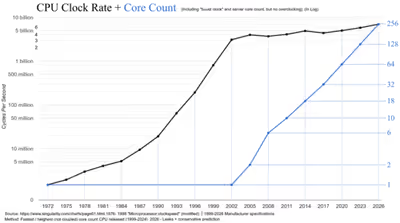
The first commercial PC, the Altair 8800 (by MITS), used an Intel 8080 CPU with a clock rate of 2 MHz (2 million cycles per second). The original IBM PC (c. 1981) had a clock rate of 4.77 MHz (4,772,727 cycles per second). In 1992, both Hewlett-Packard and Digital Equipment Corporation (DEC) exceeded 100 MHz with RISC techniques in the PA-7100 and AXP 21064 DEC Alpha respectively. In 1995, Intel's P5 Pentium chip ran at 100 MHz (100 million cycles per second). On March 6, 2000, AMD demonstrated passing the 1 GHz milestone a few days ahead of Intel shipping 1 GHz in systems. In 2002, an Intel Pentium 4 model was introduced as the first CPU with a clock rate of 3 GHz (three billion cycles per second corresponding to ~ 0.33 nanoseconds per cycle). Since then, the clock rate of production processors has increased more slowly, with performance improvements coming from other design changes.
Set in 2011, the Guinness World Record for the highest CPU clock rate is 8.42938 GHz with an overclocked AMD FX-8150 Bulldozer-based chip in an LHe/LN2 cryobath, 5 GHz on air. This is surpassed by the CPU-Z overclocking record for the highest CPU clock rate at 8.79433 GHz with an AMD FX-8350 Piledriver-based chip bathed in LN2, achieved in November 2012. It is also surpassed by the slightly slower AMD FX-8370 overclocked to 8.72 GHz which tops off the HWBOT frequency rankings. These records were broken in 2025 when an Intel Core i9-14900KF was overclocked to 9.12 GHz.
The highest boost clock rate on a production processor is the i9-14900KS, clocked at 6.2 GHz, which was released in Q1 2024.
Research
Engineers continue to find new ways to design CPUs that settle a little more quickly or use slightly less energy per transition, pushing back those limits, producing new CPUs that can run at slightly higher clock rates. The ultimate limits to energy per transition are explored in reversible computing.
The first fully reversible CPU, the Pendulum, was implemented using standard CMOS transistors in the late 1990s at the Massachusetts Institute of Technology.
Engineers also continue to find new ways to design CPUs so that they complete more instructions per clock cycle, thus achieving a lower CPI (cycles or clock cycles per instruction) count, although they may run at the same or a lower clock rate as older CPUs. This is achieved through architectural techniques such as instruction pipelining and out-of-order execution which attempts to exploit instruction level parallelism in the code.
Comparing
The clock rate of a CPU is most useful for providing comparisons between CPUs in the same family. The clock rate is only one of several factors that can influence performance when comparing processors in different families. For example, an IBM PC with an Intel 80486 CPU running at 50 MHz will be about twice as fast (internally only) as one with the same CPU and memory running at 25 MHz, while the same will not be true for MIPS R4000 running at the same clock rate as the two are different processors that implement different architectures and microarchitectures. Further, a "cumulative clock rate" measure is sometimes assumed by taking the total cores and multiplying by the total clock rate (e.g. a dual-core 2.8 GHz processor running at a cumulative 5.6 GHz). There are many other factors to consider when comparing the performance of CPUs, like the width of the CPU's data bus, the latency of the memory, and the cache architecture.
The clock rate alone is generally considered to be an inaccurate measure of performance when comparing different CPUs families. Software benchmarks are more useful. Clock rates can sometimes be misleading since the amount of work different CPUs can do in one cycle varies. For example, superscalar processors can execute more than one instruction per cycle (on average), yet it is not uncommon for them to do "less" in a clock cycle. In addition, subscalar CPUs or use of parallelism can also affect the performance of the computer regardless of clock rate.