


Related on Lably
Through Electronics, Calculation and Arithmetic
The first solid-state electronic calculator was created in the early 1960s. Pocket-sized devices became available in the 1970s, especially after the Intel 4004, the first microprocessor, was developed by Intel for the Japanese calculator company Busicom. Modern electronic calculators vary from cheap, give-away, credit-card-sized models to sturdy desktop models with built-in printers. They became popular in the mid-1970s as the incorporation of integrated circuits reduced their size and cost. By the end of that decade, prices had dropped to the point where a basic calculator was affordable to most and they became common in schools.
In addition to general-purpose calculators, there are those designed for specific markets. For example, there are scientific calculators, which include trigonometric and statistical calculations. Some calculators even have the ability to do computer algebra. Graphing calculators can be used to graph functions defined on the real line, or higher-dimensional Euclidean space. As of 2016, basic calculators cost little, but scientific and graphing models tend to cost more.
Computer operating systems as far back as early Unix have included interactive calculator programs such as dc and hoc, and interactive BASIC could be used to do calculations on most 1970s and 1980s home computers. Calculator functions are included in most smartphones, tablets, and personal digital assistant (PDA) type devices. With the very wide availability of smartphones and the like, dedicated hardware calculators, while still widely used, are less common than they once were. In 1986, calculators still represented an estimated 41% of the world's general-purpose hardware capacity to compute information. By 2007, this had diminished to less than 0.05%.
Design
Input
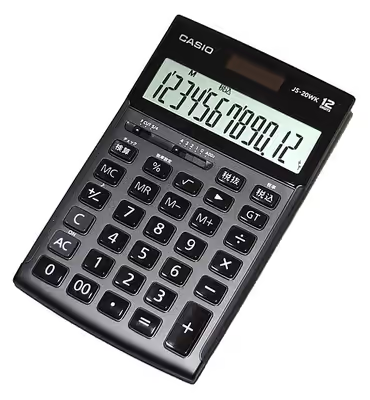
Electronic calculators contain a keyboard with buttons for digits and arithmetical operations; some even contain "00" and "000" buttons to make larger or smaller numbers easier to enter. Most basic calculators assign only one digit or operation on each button; however, in more specific calculators, a button can perform multi-function working with key combinations.
Display output
Calculators usually have liquid-crystal displays (LCD) as output in place of historical light-emitting diode (LED) displays and vacuum fluorescent displays (VFD); details are provided in the section Technical improvements.
Large-sized figures are often used to improve readability; while using decimal separator (usually a point rather than a comma) instead of or in addition to vulgar fractions. Various symbols for function commands may also be shown on the display. Fractions such as 1⁄3 are displayed as decimal approximations, for example rounded to 0.33333333. Also, some fractions (such as 1⁄7, which is 0.14285714285714; to 14 significant figures) can be difficult to recognize in decimal form; as a result, many scientific calculators are able to work in vulgar fractions or mixed numbers.
Memory
Calculators also have the ability to save numbers into computer memory. Basic calculators usually store only one number at a time; more specific types are able to store many numbers represented in variables. Usually these variables are named ans or ans(0). The variables can also be used for constructing formulas. Some models have the ability to extend memory capacity to store more numbers; the extended memory address is termed an array index.
Power source
Power sources of calculators are batteries, solar cells or mains electricity (for old models), turning on with a switch or button. Some models even have no turn-off button but they provide some way to put off (for example, leaving no operation for a moment, covering solar cell exposure, or closing their lid). Crank-powered calculators were also common in the early computer era.
Key layout
The following keys are common to most pocket calculators. While the arrangement of the digits is standard, the positions of other keys vary from model to model; the illustration is an example.
The arrangement of digits on calculator and other numeric keypads with the 7-8-9 keys two rows above the 1-2-3 keys is derived from calculators and cash registers. It is notably different from the layout of telephone Touch-Tone keypads which have the 1-2-3 keys on top and 7-8-9 keys on the third row.
Sign in to keep reading
6 more chapters are free with a Lably account.
Internal workings
In general, a basic electronic calculator consists of the following components:
- Power source (mains electricity, battery and/or solar cell)
- Keypad (input device) – consists of keys used to input numbers and function commands (addition, multiplication, square root, etc.)
- Display panel (output device) – displays input numbers, commands and results. Liquid-crystal displays (LCDs), vacuum fluorescent displays (VFDs), and light-emitting diode (LED) displays use seven segments to represent each digit in a basic calculator. Advanced calculators may use dot matrix displays.
- A printing calculator, in addition to a display panel, has a printing unit that prints results in ink or thermally onto a roll of paper.
- Processor chip (microprocessor or central processing unit).
Clock rate of a processor chip refers to the frequency at which the central processing unit (CPU) is running. It is used as an indicator of the processor's speed, and is measured in clock cycles per second or hertz (Hz). For basic calculators, the speed can vary from a few hundred hertz to the kilohertz range.
Example
A basic explanation as to how calculations are performed in a simple four-function calculator:
To perform the calculation 25 + 9, one presses keys in the following sequence on most calculators: 2 5 + 9 =.
- When 2 5 is entered, it is picked up by the keyboard scanning unit; the number 25 is encoded as two BCD digits and sent to the X register;
- Next, when the + key is pressed, the "addition" instruction is also encoded and sent to the flag or the status register;
- The second number 9 is encoded as BCD and sent to the X register. This "pushes" (shifts) the first number out into the Y register;
- When the = key is pressed, a "message" (signal) from the flag or status register tells the processor that the operation to be done is "addition";
- The numbers in the X and Y registers are then loaded into the ALU digit by digit and the calculation is carried out following instructions from the permanent or non-volatile memory;
- The answer, 34 is deposited back to the X register. From there, it is converted to seven-segment code and shown on the display panel.
Other functions are usually performed using repeated additions or subtractions.
Numeric representation
Most pocket calculators do all their calculations in binary-coded decimal (BCD) rather than binary. BCD is common in electronic systems where a numeric value is to be displayed, especially in systems consisting solely of digital logic, and not containing a microprocessor. By employing BCD, the manipulation of numerical data for display can be greatly simplified by treating each digit as a separate single sub-circuit. This matches much more closely the physical reality of display hardware—a designer might choose to use a series of separate identical seven-segment displays to build a metering circuit, for example. If the numeric quantity were stored and manipulated as pure binary, interfacing to such a display would require complex circuitry. Therefore, in cases where the calculations are relatively simple, working throughout with BCD can lead to a simpler overall system than converting to and from binary. (For example, CDs keep the track number in BCD, limiting them to 99 tracks.)
The same argument applies when hardware of this type uses an embedded microcontroller or other small processor. Often, smaller code results when representing numbers internally in BCD format, since a conversion from or to binary representation can be expensive on such limited processors. For these applications, some small processors feature BCD arithmetic modes, which assist when writing routines that manipulate BCD quantities.
Where calculators have added functions (such as square root, or trigonometric functions), software algorithms are required to produce high precision results. Sometimes significant design effort is needed to fit all the desired functions in the limited memory space available in the calculator chip, with acceptable calculation time.
History
Precursors to the electronic calculator
The first known tools used to aid arithmetic calculations were: bones (used to tally items), pebbles, counting boards, and the abacus, which have been used by Sumerians and Egyptians before 2000 BC. Except for the Antikythera mechanism (an "out of the time" astronomical device), development of computing tools arrived near the start of the 17th century: the geometric-military compass (by Galileo), logarithms and Napier bones (by Napier), and the slide rule (by Edmund Gunter).
The Renaissance saw the invention of the mechanical calculator by Wilhelm Schickard in 1623, and later by Blaise Pascal in 1642. A device that was at times somewhat over-promoted as being able to perform all four arithmetic operations with minimal human intervention. Pascal's calculator could add and subtract two numbers directly and thus, if the tedium could be borne, multiply and divide by repetition. Schickard's machine, constructed several decades earlier, used a clever set of mechanised multiplication tables to ease the process of multiplication and division with the adding machine as a means of completing this operation. There is a debate about whether Pascal or Shickard should be credited as the known inventor of a calculating machine due to the differences (like the different aims) of both inventions. Schickard and Pascal were followed by Gottfried Leibniz who spent forty years designing a four-operation mechanical calculator, the stepped reckoner, inventing in the process his leibniz wheel, but who couldn't design a fully operational machine. There were also five unsuccessful attempts to design a calculating clock in the 17th century.
The 18th century saw the arrival of some notable improvements, first by Poleni with the first fully functional calculating clock and four-operation machine, but these machines were almost always one of a kind. Luigi Torchi invented the first direct multiplication machine in 1834: this was also the second key-driven machine in the world, following that of James White (1822). It was not until the 19th century and the Industrial Revolution that real developments began to occur. Although machines capable of performing all four arithmetic functions existed prior to the 19th century, the refinement of manufacturing and fabrication processes during the eve of the industrial revolution made large scale production of more compact and modern units possible. The Arithmometer, invented in 1820 as a four-operation mechanical calculator, was released to production in 1851 as an adding machine and became the first commercially successful unit; forty years later, by 1890, about 2,500 arithmometers had been sold plus a few hundreds more from two arithmometer clone makers (Burkhardt, Germany, 1878 and Layton, UK, 1883) and Felt and Tarrant, the only other competitor in true commercial production, had sold 100 comptometers.
It wasn't until 1902 that the familiar push-button user interface was developed, with the introduction of the Dalton Adding Machine, developed by James L. Dalton in the United States.
In 1921, Edith Clarke invented the "Clarke calculator", a simple graph-based calculator for solving line equations involving hyperbolic functions. This allowed electrical engineers to simplify calculations for inductance and capacitance in power transmission lines.
The Curta calculator was developed in 1948 and, although costly, became popular for its portability. This purely mechanical hand-held device could do addition, subtraction, multiplication and division. By the early 1970s electronic pocket calculators ended manufacture of mechanical calculators, although the Curta remains a popular collectable item.
Development of electronic calculators
The first mainframe computers, initially using vacuum tubes and later transistors in the logic circuits, appeared in the 1940s and 1950s. Electronic circuits developed for computers also had application to electronic calculators.
The Casio Computer Company, in Japan, released the Model 14-A calculator in 1957, which was the world's first all-electric (relatively) compact calculator. It did not use electronic logic but was based on relay technology, and was built into a desk. The IBM 608 plugboard programmable calculator was IBM's first all-transistor product, released in 1957; this was a console type system, with input and output on punched cards, and replaced the earlier, larger, vacuum-tube IBM 603.
In October 1961, the world's first all-electronic desktop calculator, the British Bell Punch/Sumlock Comptometer ANITA (A New Inspiration To Arithmetic/Accounting) was announced. This machine used vacuum tubes, cold-cathode tubes and Dekatrons in its circuits, with 12 cold-cathode "Nixie" tubes for its display. Two models were displayed, the Mk VII for continental Europe and the Mk VIII for Britain and the rest of the world, both for delivery from early 1962. The Mk VII was a slightly earlier design with a more complicated mode of multiplication, and was soon dropped in favour of the simpler Mark VIII. The ANITA had a full keyboard, similar to mechanical comptometers of the time, a feature that was unique to it and the later Sharp CS-10A among electronic calculators. The ANITA weighed roughly 33 pounds (15 kg) due to its large tube system. Bell Punch had been producing key-driven mechanical calculators of the comptometer type under the names "Plus" and "Sumlock", and had realised in the mid-1950s that the future of calculators lay in electronics. They employed the young graduate Norbert Kitz, who had worked on the early British Pilot ACE computer project, to lead the development. The ANITA sold well since it was the only electronic desktop calculator available, and was silent and quick.
The tube technology of the ANITA was superseded in June 1963 by the U.S. manufactured Friden EC-130, which had an all-transistor design, a stack of four 13-digit numbers displayed on a 5-inch (13 cm) cathode ray tube (CRT), and introduced Reverse Polish Notation (RPN) to the calculator market for a price of $2200, which was about three times the cost of an electromechanical calculator of the time. Like Bell Punch, Friden was a manufacturer of mechanical calculators that had decided that the future lay in electronics. In 1964 more all-transistor electronic calculators were introduced: Sharp introduced the CS-10A, which weighed 25 kilograms (55 lb) and cost 500,000 yen ($4555.81), and Industria Macchine Elettroniche of Italy introduced the IME 84, to which several extra keyboard and display units could be connected so that several people could make use of it (but apparently not at the same time). The Victor 3900 was the first to use integrated circuits in place of individual transistors, but production problems delayed sales until 1966.
There followed a series of electronic calculator models from these and other manufacturers, including Canon, Mathatronics, Olivetti, SCM (Smith-Corona-Marchant), Sony, Toshiba, and Wang. The early calculators used hundreds of germanium transistors, which were cheaper than silicon transistors, on multiple circuit boards. Display types used were CRT, cold-cathode Nixie tubes, and filament lamps. Memory technology was usually based on the delay-line memory or the magnetic-core memory, though the Toshiba "Toscal" BC-1411 appears to have used an early form of dynamic RAM built from discrete components. Already there was a desire for smaller and less power-hungry machines.
Bulgaria's ELKA 6521, introduced in 1965, was developed by the Central Institute for Calculation Technologies and built at the Elektronika factory in Sofia. The name derives from ELektronen KAlkulator, and it weighed around 8 kg (18 lb). It is the first calculator in the world which includes the square root function. Later that same year were released the ELKA 22 (with a luminescent display) and the ELKA 25, with an built-in printer. Several other models were developed until the first pocket model, the ELKA 101, was released in 1974. The writing on it was in Roman script, and it was exported to western countries.
Programmable calculators
The first desktop programmable calculators were produced in the mid-1960s. They included the Mathatronics Mathatron (1964) and the Olivetti Programma 101 (late 1965) which were solid-state, desktop, printing, floating point, algebraic entry, programmable, stored-program electronic calculators. Both could be programmed by the end user and print out their results. The Programma 101 saw much wider distribution and had the added feature of offline storage of programs via magnetic cards.
Another early programmable desktop calculator (and maybe the first Japanese one) was the Casio (AL-1000) produced in 1967. It featured a nixie tubes display and had transistor electronics and ferrite core memory.
The Monroe Epic programmable calculator came on the market in 1967. A large, printing, desk-top unit, with an attached floor-standing logic tower, it could be programmed to perform many computer-like functions. However, the only branch instruction was an implied unconditional branch (GOTO) at the end of the operation stack, returning the program to its starting instruction. Thus, it was not possible to include any conditional branch (IF-THEN-ELSE) logic. During this era, the absence of the conditional branch was sometimes used to distinguish a programmable calculator from a computer.
The first Soviet programmable desktop calculator ISKRA 123, powered by the power grid, was released at the start of the 1970s.
1970s to mid-1980s
The electronic calculators of the mid-1960s were large and heavy desktop machines due to their use of hundreds of transistors on several circuit boards with a large power consumption that required an AC power supply. There were great efforts to put the logic required for a calculator into fewer and fewer integrated circuits (chips) and calculator electronics was one of the leading edges of semiconductor development. U.S. semiconductor manufacturers led the world in large scale integration (LSI) semiconductor development, squeezing more and more functions into individual integrated circuits. This led to alliances between Japanese calculator manufacturers and U.S. semiconductor companies: Canon Inc. with Texas Instruments, Hayakawa Electric (later renamed Sharp Corporation) with North-American Rockwell Microelectronics (later renamed Rockwell International), Busicom with Mostek and Intel, and General Instrument with Sanyo.
Pocket calculators
Released in 1947, the first pocket calculator which could perform the four basic arithmetic functions with digital precision was the Curta, a mechanical device operated by a crank, bearing "an uncanny resemblance to a pepper grinder". The readout was digital with eleven digits of precision. For comparison, the contemporaneous ten inch slide rule used analog calculation to approximate answers to only four digits of precision. The Curta remained the finest pocket calculator available for a quarter of a century.
By 1970, a calculator could be made using just a few chips of low power consumption, allowing portable models powered from rechargeable batteries. The first handheld calculator was a 1967 prototype called Cal Tech, whose development was led by Jack Kilby at Texas Instruments in a research project to produce a portable calculator. It could add, multiply, subtract, and divide, and its output device was a paper tape. As a result of the "Cal-Tech" project, Texas Instruments was granted master patents on portable calculators.
The first commercially produced portable calculators appeared in Japan in 1970, and were soon marketed around the world. These included the Sanyo ICC-0081 "Mini Calculator", the Canon Pocketronic, and the Sharp QT-8B "micro Compet". The Canon Pocketronic was a development from the "Cal-Tech" project. It had no traditional display; numerical output was on thermal paper tape.
Sharp put in great efforts in size and power reduction and introduced in January 1971 the Sharp EL-8, also marketed as the Facit 1111, which was close to being a pocket calculator. It weighed 1.59 pounds (721 grams), had a vacuum fluorescent display, rechargeable NiCad batteries, and initially sold for US$395.
However, integrated circuit development efforts culminated in early 1971 with the introduction of the first "calculator on a chip", the MK6010 by Mostek, followed by Texas Instruments later in the year. Although these early hand-held calculators were very costly, these advances in electronics, together with developments in display technology (such as the vacuum fluorescent display, LED, and LCD), led within a few years to the cheap pocket calculator available to all.
In 1971, Pico Electronics and General Instrument also introduced their first collaboration in ICs, a full single chip calculator IC for the Monroe Royal Digital III calculator. Pico was a spinout by five GI design engineers whose vision was to create single chip calculator ICs. Pico and GI went on to have significant success in the burgeoning handheld calculator market.
The first truly pocket-sized electronic calculator was the Busicom LE-120A "HANDY", which was marketed early in 1971. Made in Japan, this was also the first calculator to use an LED display, the first hand-held calculator to use a single integrated circuit (then proclaimed as a "calculator on a chip"), the Mostek MK6010, and the first electronic calculator to run off replaceable batteries. Using four AA-size cells the LE-120A measures 4.9 by 2.8 by 0.9 inches (124 mm × 71 mm × 23 mm).
The first European-made pocket-sized calculator, DB 800 was made in May 1971 by Digitron in Buje, Croatia (former Yugoslavia) with four functions and an eight-digit display and special characters for a negative number and a warning that the calculation has too many digits to display.
The first American-made pocket-sized calculator, the Bowmar 901B (popularly termed The Bowmar Brain), measuring 5.2 by 3.0 by 1.5 inches (132 mm × 76 mm × 38 mm), came out in the autumn of 1971, with four functions and an eight-digit red LED display, for US$240, while in August 1972 the four-function Sinclair Executive became the first slimline pocket calculator measuring 5.4 by 2.2 by 0.35 inches (137.2 mm × 55.9 mm × 8.9 mm) and weighing 2.5 ounces (71 g). It retailed for around £79 (US$194 at the time). By the end of the decade, similar calculators were priced less than £5 ($6.85). Following protracted development over the course of two years including a botched partnership with Texas Instruments, Eldorado Electrodata released five pocket calculators in 1972. One called the Touch Magic was "no bigger than a pack of cigarettes" according to Administrative Management.
The first Soviet Union made pocket-sized calculator, the Elektronika B3-04 was developed by the end of 1973 and sold at the start of 1974.
One of the first low-cost calculators was the Sinclair Cambridge, launched in August 1973. It retailed for £29.95 ($41.03), or £5 ($6.85) less in kit form, and later models included some scientific functions. The Sinclair calculators were successful because they were far cheaper than the competition; however, their design led to slow and less accurate computations of transcendental functions (maximum three decimal places of accuracy).
Scientific pocket calculators
Meanwhile, Hewlett-Packard (HP) had been developing a pocket calculator. Launched in early 1972, it was unlike the other basic four-function pocket calculators then available in that it was the first pocket calculator with scientific functions that could replace a slide rule. The $395 HP-35, along with nearly all later HP engineering calculators, uses reverse Polish notation (RPN), also called postfix notation. A calculation like "8 plus 5" is, using RPN, performed by pressing 8, Enter↑, 5, and +; instead of the algebraic infix notation: 8, +, 5, =. It had 35 buttons and was based on Mostek Mk6020 chip.
The first Soviet scientific pocket-sized calculator the "B3-18" was completed by the end of 1975.
In 1973, Texas Instruments (TI) introduced the SR-10, (SR signifying slide rule) an algebraic entry pocket calculator using scientific notation for $150. Shortly after the SR-11 featured an added key for entering pi (π). It was followed the next year by the SR-50 which added log and trig functions to compete with the HP-35, and in 1977 the mass-marketed TI-30 line which is still produced.
In 1978, a new company, Calculated Industries arose which focused on specialized markets. Their first calculator, the Loan Arranger (1978) was a pocket calculator marketed to the Real Estate industry with preprogrammed functions to simplify the process of calculating payments and future values. In 1985, CI launched a calculator for the construction industry called the Construction Master which came preprogrammed with common construction calculations (such as angles, stairs, roofing math, pitch, rise, run, and feet-inch fraction conversions). This would be the first in a line of construction related calculators.
Programmable pocket calculators
The first programmable pocket calculator was the HP-65, in 1974; it had a capacity of 100 instructions, and could store and retrieve programs with a built-in magnetic card reader. Two years later the HP-25C introduced continuous memory, i.e., programs and data were retained in CMOS memory during power-off. In 1979, HP released the first alphanumeric, programmable, expandable calculator, the HP-41C. It could be expanded with random-access memory (RAM, for memory) and read-only memory (ROM, for software) modules, and peripherals like bar code readers, microcassette and floppy disk drives, paper-roll thermal printers, and miscellaneous communication interfaces (RS-232, HP-IL, HP-IB).
The first Soviet pocket battery-powered programmable calculator, Elektronika B3-21, was developed by the end of 1976 and released at the start of 1977. The successor of B3-21, the Elektronika B3-34 wasn't backward compatible with B3-21, even if it kept the reverse Polish notation (RPN). Thus B3-34 defined a new command set, which later was used in a series of later programmable Soviet calculators. Despite very limited abilities (98 bytes of instruction memory and about 19 stack and addressable registers), people managed to write all kinds of programs for them, including adventure games and libraries of calculus-related functions for engineers. Hundreds, perhaps thousands, of programs were written for these machines, from practical scientific and business software, which were used in real-life offices and labs, to fun games for children. The Elektronika MK-52 calculator (using the extended B3-34 command set, and featuring internal EEPROM memory for storing programs and external interface for EEPROM cards and other periphery) was used in Soviet spacecraft program (for Soyuz TM-7 flight) as a backup of the board computer.
This series of calculators was also noted for a large number of highly counter-intuitive mysterious undocumented features, somewhat similar to "synthetic programming" of the American HP-41, which were exploited by applying normal arithmetic operations to error messages, jumping to nonexistent addresses and other methods. A number of respected monthly publications, including the popular science magazine Nauka i Zhizn (Наука и жизнь, Science and Life), featured special columns, dedicated to optimization methods for calculator programmers and updates on undocumented features for hackers, which grew into a whole esoteric science with many branches, named "yeggogology" ("еггогология"). The error messages on those calculators appear as a Russian word "YEGGOG" ("ЕГГОГ") which, unsurprisingly, is translated to "Error".
A similar hacker culture in the US revolved around the HP-41, which was also noted for a large number of undocumented features and was much more powerful than B3-34.
Technical improvements
Through the 1970s the hand-held electronic calculator underwent rapid development. The red LED and blue/green vacuum fluorescent displays consumed a lot of power and the calculators either had a short battery life (often measured in hours, so rechargeable nickel-cadmium batteries were common) or were large so that they could take larger, higher capacity batteries. In the early 1970s liquid-crystal displays (LCDs) were in their infancy and there was a great deal of concern that they only had a short operating lifetime. Busicom introduced the Busicom LE-120A "HANDY" calculator, the first pocket-sized calculator and the first with an LED display, and announced the Busicom LC with LCD. However, there were problems with this display and the calculator never went on sale. The first successful calculators with LCDs were manufactured by Rockwell International and sold from 1972 by other companies under such names as: Dataking LC-800, Harden DT/12, Ibico 086, Lloyds 40, Lloyds 100, Prismatic 500 (a.k.a. P500), Rapid Data Rapidman 1208LC. The LCDs were an early form using the Dynamic Scattering Mode DSM with the numbers appearing as bright against a dark background. To present a high-contrast display these models illuminated the LCD using a filament lamp and solid plastic light guide, which negated the low power consumption of the display. These models appear to have been sold only for a year or two.
A more successful series of calculators using a reflective DSM-LCD was launched in 1972 by Sharp Inc with the Sharp EL-805, which was a slim pocket calculator. This, and another few similar models, used Sharp's Calculator On Substrate (COS) technology. An extension of one glass plate needed for the liquid crystal display was used as a substrate to mount the needed chips based on a new hybrid technology. The COS technology may have been too costly since it was only used in a few models before Sharp reverted to conventional circuit boards.
In the mid-1970s the first calculators appeared with field-effect, twisted nematic (TN) LCDs with dark numerals against a grey background, though the early ones often had a yellow filter over them to cut out damaging ultraviolet rays. The advantage of LCDs is that they are passive light modulators reflecting light, which require much less power than light-emitting displays such as LEDs or VFDs. This led the way to the first credit-card-sized calculators, such as the Casio Mini Card LC-78 of 1978, which could run for months of normal use on button cells.
There were also improvements to the electronics inside the calculators. All of the logic functions of a calculator had been squeezed into the first "calculator on a chip" integrated circuits (ICs) in 1971, but this was leading edge technology of the time and yields were low and costs were high. Many calculators continued to use two or more ICs, especially the scientific and the programmable ones, into the late 1970s.
The power consumption of the integrated circuits was also reduced, especially with the introduction of CMOS technology. Appearing in the Sharp "EL-801" in 1972, the transistors in the logic cells of CMOS ICs only used any appreciable power when they changed state. The LED and VFD displays often required added driver transistors or ICs, whereas the LCDs were more amenable to being driven directly by the calculator IC itself.
With this low power consumption came the possibility of using solar cells as the power source, realised around 1978 by calculators such as the Royal Solar 1, Sharp EL-8026, and Teal Photon.
Mass-market phase
At the start of the 1970s, hand-held electronic calculators were very costly, at two or three weeks' wages, and so were a luxury item. The high price was due to their construction requiring many mechanical and electronic components which were costly to produce, and production runs that were too small to exploit economies of scale. Many firms saw that there were good profits to be made in the calculator business with the margin on such high prices. However, the cost of calculators fell as components and their production methods improved, and the effect of economies of scale was felt.
By 1976, the cost of the cheapest four-function pocket calculator had dropped to a few dollars, about 1/20 of the cost five years before. The results of this were that the pocket calculator was affordable, and that it was now difficult for the manufacturers to make a profit from calculators, leading to many firms dropping out of the business or closing. The firms that survived making calculators tended to be those with high outputs of higher quality calculators, or producing high-specification scientific and programmable calculators.
Mid-1980s to present
The first calculator capable of symbolic computing was the HP-28C, released in 1987. It could, for example, solve quadratic equations symbolically. The first graphing calculator was the Casio fx-7000G released in 1985.
The two leading manufacturers, HP and TI, released increasingly feature-laden calculators during the 1980s and 1990s. At the turn of the millennium, the line between a graphing calculator and a handheld computer was not always clear, as some very advanced calculators such as the TI-89, the Voyage 200 and HP-49G could differentiate and integrate functions, solve differential equations, run word processing and PIM software, and connect by wire or IR to other calculators/computers.
The HP 12c financial calculator is still produced. It was introduced in 1981 and is still being made with few changes. The HP 12c featured the reverse Polish notation mode of data entry. In 2003 several new models were released, including an improved version of the HP 12c, the "HP 12c platinum edition" which added more memory, more built-in functions, and the addition of the algebraic mode of data entry.
Calculated Industries competed with the HP 12c in the mortgage and real estate markets by differentiating the key labeling; changing the "I", "PV", "FV" to easier labeling terms such as "Int", "Term", "Pmt", and not using the reverse Polish notation. However, CI's more successful calculators involved a line of construction calculators, which evolved and expanded in the 1990s to present. According to Mark Bollman, a mathematics and calculator historian and associate professor of mathematics at Albion College, the "Construction Master is the first in a long and profitable line of CI construction calculators" which carried them through the 1980s, 1990s, and to the present.
Use in education
In most countries, students use calculators for schoolwork. There was some initial resistance to the idea out of fear that basic or elementary arithmetic skills would suffer. There remains disagreement about the importance of the ability to perform calculations in the head, with some curricula restricting calculator use until a certain level of proficiency has been obtained, while others concentrate more on teaching estimation methods and problem-solving. Research suggests that inadequate guidance in the use of calculating tools can restrict the kind of mathematical thinking that students engage in. Others have argued that calculator use can even cause core mathematical skills to atrophy, or that such use can prevent understanding of advanced algebraic concepts. In December 2011 the UK's Minister of State for Schools, Nick Gibb, voiced concern that children can become "too dependent" on the use of calculators. As a result, the use of calculators is to be included as part of a review of the Curriculum. In the United States, many math educators and boards of education have enthusiastically endorsed the National Council of Teachers of Mathematics (NCTM) standards and actively promoted the use of classroom calculators from kindergarten through high school.
Calculators may in some circumstances be used within school and college examinations. In the United Kingdom there are limitations on the type of calculator which may be used in an examination to avoid malpractice. Some calculators which offer additional functionality have an "exam mode" setting which makes them compliant with examination regulations.
Personal computers
Personal computers often come with a calculator utility program that emulates the appearance and functions of a calculator, using the graphical user interface to portray a calculator. Examples include the Windows Calculator, Apple's Calculator, and KDE's KCalc. Most personal data assistants (PDAs) and smartphones also have such a feature.
Calculators compared to computers
The fundamental difference between a calculator and computer is that a computer can be programmed in a way that allows the program to take different branches according to intermediate results, while calculators are pre-designed with specific functions (such as addition, multiplication, and logarithms) built in. The distinction is not clear-cut: some devices classed as programmable calculators have programming functions, sometimes with support for programming languages (such as RPL or TI-BASIC).
For instance, instead of a hardware multiplier, a calculator might implement floating point mathematics with code in read-only memory (ROM), and compute trigonometric functions with the CORDIC algorithm because CORDIC does not require much multiplication. Bit serial logic designs are more common in calculators whereas bit parallel designs dominate general-purpose computers, because a bit serial design minimizes chip complexity, but takes many more clock cycles. This distinction blurs with high-end calculators, which use processor chips associated with computer and embedded systems design, more so the Z80, MC68000, and ARM architectures, and some custom designs specialized for the calculator market.