

BIOS
Firmware for hardware initialization and OS runtime services
- 31 min read
- 11 chapters

Related on Lably
Through Computing, Operating system and Computer program
The name originates from the Basic Input/Output System used in the CP/M operating system in 1975. The BIOS firmware was originally proprietary to the IBM PC; it was reverse engineered by some companies, such as Compaq, Phoenix Technologies, AMI and others, looking to create compatible systems. The interface of that original system serves as a de facto standard.
The BIOS in older PCs initializes and tests the system hardware components (power-on self-test or POST for short), and loads a boot loader from a mass storage device which then initializes a kernel. In the era of DOS, the BIOS provided BIOS interrupt calls for the keyboard, display, storage, and other input/output (I/O) devices that standardized an interface to application programs and the operating system. More recent operating systems do not use the BIOS interrupt calls after startup.
Most BIOS implementations are specifically designed to work with a particular computer or motherboard model, by interfacing with various devices especially system chipset. Originally, BIOS firmware was stored in a ROM chip on the PC motherboard. In later computer systems, the BIOS contents are stored on flash memory so it can be rewritten without removing the chip from the motherboard. This allows easy, end-user updates to the BIOS firmware so new features can be added or bugs can be fixed, but it also creates a possibility for the computer to become infected with BIOS rootkits. Furthermore, a BIOS upgrade that fails could brick the motherboard.
Unified Extensible Firmware Interface (UEFI) is a successor to the legacy PC BIOS, aiming to address its technical limitations. UEFI firmware may include legacy BIOS compatibility to maintain compatibility with operating systems and option cards that do not support UEFI native operation. Intel phased out providing support for booting from the BIOS interface from 2020 to 2024 depending on the platform. The last version of Microsoft Windows to officially support running on PCs which use legacy BIOS firmware is Windows 10 as Windows 11 requires a UEFI-compliant system (except for IoT Enterprise editions of Windows 11 since version 24H2).
History
/* C P / M B A S I C I / O S Y S T E M (B I O S) COPYRIGHT GARY A. KILDALL JUNE, 1975 */ […] /* B A S I C D I S K O P E R A T I N G S Y S T E M (B D O S) COPYRIGHT GARY A. KILDALL JUNE, 1975 */
— An excerpt from the BDOS.PLM file header in the PL/M source code of CP/M 1.1 or 1.2 for Lawrence Livermore Laboratories (LLL)
The term BIOS (Basic Input/Output System) was created by Gary Kildall and first appeared in the CP/M operating system in 1975, describing the machine-specific part of CP/M loaded during boot time that interfaces directly with the hardware. (A CP/M machine usually has only a simple boot loader in its ROM.)
Versions of MS-DOS, PC DOS or DR-DOS contain a file called variously "IO.SYS", "IBMBIO.COM", "IBMBIO.SYS", or "DRBIOS.SYS"; this file is known as the "DOS BIOS" (also known as the "DOS I/O System") and contains the lower-level hardware-specific part of the operating system. Together with the underlying hardware-specific but operating system-independent "System BIOS", which resides in ROM, it represents the analogue to the "CP/M BIOS".
The BIOS originally proprietary to the IBM PC has been reverse engineered by some companies, such as Compaq, Phoenix Technologies, AMI and others, looking to create compatible systems.
With the introduction of PS/2 machines, IBM divided the System BIOS into real- and protected-mode portions. The real-mode portion was meant to provide backward compatibility with existing operating systems such as DOS, and therefore was named "CBIOS" (for "Compatibility BIOS"), whereas the "ABIOS" (for "Advanced BIOS") provided new interfaces specifically suited for multitasking operating systems such as OS/2.
Sign in to keep reading
10 more chapters are free with a Lably account.
User interface
The BIOS of the original IBM PC and XT had no interactive user interface. Error codes or messages were displayed on the screen, or coded series of sounds were generated to signal errors when the power-on self-test (POST) had not proceeded to the point of successfully initializing a video display adapter. Options on the IBM PC and XT were set by switches and jumpers on the main board and on expansion cards. Starting around the mid-1990s, it became typical for the BIOS ROM to include a "BIOS configuration utility" (BCU) or "BIOS setup utility", accessed at system power-up by a particular key sequence. This program allowed the user to set system configuration options, of the type formerly set using DIP switches, through an interactive menu system controlled through the keyboard. In the interim period, IBM-compatible PCs—including the IBM AT—held configuration settings in battery-backed RAM and used a bootable configuration program on floppy disk, not in the ROM, to set the configuration options contained in this memory. The floppy disk was supplied with the computer, and if it was lost the system settings could not be changed. The same applied in general to computers with an EISA bus, for which the configuration program was called an EISA Configuration Utility (ECU).
A modern Wintel-compatible computer provides a setup routine essentially unchanged in nature from the ROM-resident BIOS setup utilities of the late 1990s; the user can configure hardware options using the keyboard and video display. The modern Wintel machine may store the BIOS configuration settings in flash ROM, perhaps the same flash ROM that holds the BIOS itself.
Extensions (option ROMs)
Peripheral cards such as hard disk drive host bus adapters and video cards have their own firmware, and BIOS extension option ROM code may be a part of the expansion card firmware; that code provides additional capabilities in the BIOS. Code in option ROMs runs before the BIOS boots the operating system from mass storage. These ROMs typically test and initialize hardware, add new BIOS services, or replace existing BIOS services with their own services. For example, a SCSI controller usually has a BIOS extension ROM that adds support for hard drives connected through that controller. An extension ROM could in principle contain operating system, or it could implement an entirely different boot process such as network booting. Operation of an IBM-compatible computer system can be completely changed by removing or inserting an adapter card (or a ROM chip) that contains a BIOS extension ROM.
The motherboard BIOS typically contains code for initializing and bootstrapping integrated display and integrated storage. The initialization process can involve the execution of code related to the device being initialized, for locating the device, verifying the type of device, then establishing base registers, setting pointers, establishing interrupt vector tables, selecting paging modes which are ways for organizing available registers in devices, setting default values for accessing software routines related to interrupts, and setting the device's configuration using default values. In addition, plug-in adapter cards such as SCSI, RAID, network interface cards, and video cards often include their own BIOS (e.g., Video BIOS), complementing or replacing the system BIOS code for the given component. Even devices built into the motherboard can behave in this way; their option ROMs can be a part of the motherboard BIOS.
An add-in card requires an option ROM if the card is not supported by the motherboard BIOS and the card needs to be initialized or made accessible through BIOS services before the operating system can be loaded (usually this means it is required in the boot process). An additional advantage of ROM on some early PC systems (notably including the IBM PCjr) was that ROM was faster than main system RAM. (On modern systems, the case is very much the reverse of this, and BIOS ROM code is usually copied ("shadowed") into RAM so it will run faster.)
Physical placement
Option ROMs normally reside on adapter cards. However, the original PC, and perhaps also the PC XT, have a spare ROM socket on the motherboard (the "system board" in IBM's terms) into which an option ROM can be inserted, and the four ROMs that contain the BASIC interpreter can also be removed and replaced with custom ROMs which can be option ROMs. The IBM PCjr is unique among PCs in having two ROM cartridge slots on the front. Cartridges in these slots map into the same region of the upper memory area used for option ROMs, and the cartridges can contain option ROM modules that the BIOS would recognize. The cartridges can also contain other types of ROM modules, such as BASIC programs, that are handled differently. One PCjr cartridge can contain several ROM modules of different types, possibly stored together in one ROM chip.
Operation
System startup
The 8086 and 8088 start at physical address FFFF0h. The 80286 starts at physical address FFFFF0h. The 80386 and later x86 processors start at physical address FFFFFFF0h. When the system is initialized, the first instruction of the BIOS appears at that address.
If the system has just been powered up or the reset button was pressed ("cold boot"), the full power-on self-test (POST) is run. If Ctrl+Alt+Delete was pressed ("warm boot"), a special flag value stored in nonvolatile BIOS memory ("CMOS") tested by the BIOS allows bypass of the lengthy POST and memory detection.
The POST identifies, tests and initializes system devices such as the CPU, chipset, RAM, motherboard, video card, keyboard, mouse, hard disk drive, optical disc drive and other hardware, including integrated peripherals.
Early IBM PCs had a routine in the POST that would download a program into RAM through the keyboard port and run it. This feature was intended for factory test or diagnostic purposes.
After the motherboard BIOS completes its POST, most BIOS versions search for option ROM modules, also called BIOS extension ROMs, and execute them. The motherboard BIOS scans for extension ROMs in a portion of the "upper memory area" (the part of the x86 real-mode address space at and above address 0xA0000) and runs each ROM found, in order. To discover memory-mapped option ROMs, a BIOS implementation scans the real-mode address space from 0x0C0000 to 0x0F0000 on 2 KB (2,048 bytes) boundaries, looking for a two-byte ROM signature: 0x55 followed by 0xAA. In a valid expansion ROM, this signature is followed by a single byte indicating the number of 512-byte blocks the expansion ROM occupies in real memory, and the next byte is the option ROM's entry point (also known as its "entry offset"). If the ROM has a valid checksum, the BIOS transfers control to the entry address, which in a normal BIOS extension ROM should be the beginning of the extension's initialization routine.
At this point, the extension ROM code takes over, typically testing and initializing the hardware it controls and registering interrupt vectors for use by post-boot applications. It may use BIOS services (including those provided by previously initialized option ROMs) to provide a user configuration interface, to display diagnostic information, or to do anything else that it requires.
An option ROM should normally return to the BIOS after completing its initialization process. Once (and if) an option ROM returns, the BIOS continues searching for more option ROMs, calling each as it is found, until the entire option ROM area in the memory space has been scanned. It is possible that an option ROM will not return to BIOS, pre-empting the BIOS's boot sequence altogether.
Boot process
After the POST completes and, in a BIOS that supports option ROMs, after the option ROM scan is completed and all detected ROM modules with valid checksums have been called, the BIOS calls interrupt 19h to start boot processing. Post-boot, programs loaded can also call interrupt 19h to reboot the system, but they must be careful to disable interrupts and other asynchronous hardware processes that may interfere with the BIOS rebooting process, or else the system may hang or crash while it is rebooting.
When interrupt 19h is called, the BIOS attempts to locate boot loader software on a "boot device", such as a hard disk, a floppy disk, CD, or DVD. It loads and executes the first boot software it finds, giving it control of the PC.
The BIOS uses the boot devices set in Nonvolatile BIOS memory (CMOS), or, in the earliest PCs, DIP switches. The BIOS checks each device in order to see if it is bootable by attempting to load the first sector (boot sector). If the sector cannot be read, the BIOS proceeds to the next device. If the sector is read successfully, some BIOSes will also check for the boot sector signature 0x55 0xAA in the last two bytes of the sector (which is 512 bytes long), before accepting a boot sector and considering the device bootable.
When a bootable device is found, the BIOS transfers control to the loaded sector. The BIOS does not interpret the contents of the boot sector other than to possibly check for the boot sector signature in the last two bytes. Interpretation of data structures like partition tables and BIOS Parameter Blocks is done by the boot program in the boot sector itself or by other programs loaded through the boot process.
A non-disk device such as a network adapter attempts booting by a procedure that is defined by its option ROM or the equivalent integrated into the motherboard BIOS ROM. As such, option ROMs may also influence or supplant the boot process defined by the motherboard BIOS ROM.
With the El Torito optical media boot standard, the optical drive actually emulates a 3.5" high-density floppy disk to the BIOS for boot purposes. Reading the "first sector" of a CD-ROM or DVD-ROM is not a simply defined operation like it is on a floppy disk or a hard disk. Furthermore, the complexity of the medium makes it difficult to write a useful boot program in one sector. The bootable virtual floppy disk can contain software that provides access to the optical medium in its native format.
If an expansion ROM wishes to change the way the system boots (such as from a network device or a SCSI adapter) in a cooperative way, it can use the BIOS Boot Specification (BBS) API to register its ability to do so. Once the expansion ROMs have registered using the BBS APIs, the user can select among the available boot options from within the BIOS's user interface. This is why most BBS compliant PC BIOS implementations will not allow the user to enter the BIOS's user interface until the expansion ROMs have finished executing and registering themselves with the BBS API.
Also, if an expansion ROM wishes to change the way the system boots unilaterally, it can simply hook interrupt 19h or other interrupts normally called from interrupt 19h, such as interrupt 13h, the BIOS disk service, to intercept the BIOS boot process. Then it can replace the BIOS boot process with one of its own, or it can merely modify the boot sequence by inserting its own boot actions into it, by preventing the BIOS from detecting certain devices as bootable, or both. Before the BIOS Boot Specification was promulgated, this was the only way for expansion ROMs to implement boot capability for devices not supported for booting by the native BIOS of the motherboard.
Boot priority
The user can select the boot priority implemented by the BIOS. For example, most computers have a hard disk that is bootable, but sometimes there is a removable-media drive that has higher boot priority, so the user can cause a removable disk to be booted.
In most modern BIOSes, the boot priority order can be configured by the user. In older BIOSes, limited boot priority options are selectable; in the earliest BIOSes, a fixed priority scheme was implemented, with floppy disk drives first, fixed disks (i.e., hard disks) second, and typically no other boot devices supported, subject to modification of these rules by installed option ROMs. The BIOS in an early PC also usually would only boot from the first floppy disk drive or the first hard disk drive, even if there were two drives installed.
Boot failure
On the original IBM PC and XT, if no bootable disk was found, the BIOS would try to start ROM BASIC with the interrupt call to interrupt 18h. Since few programs used BASIC in ROM, clone PC makers left it out; then a computer that failed to boot from a disk would display "No ROM BASIC" and halt (in response to interrupt 18h).
Later computers would display a message like "No bootable disk found"; some would prompt for a disk to be inserted and a key to be pressed to retry the boot process. A modern BIOS may display nothing or may automatically enter the BIOS configuration utility when the boot process fails.
Boot environment
The environment for the boot program is very simple: the CPU is in real mode and the general-purpose and segment registers are undefined, except SS, SP, CS, and DL. CS:IP always points to physical address 0x07C00. What values CS and IP actually have is not well defined. Some BIOSes use a CS:IP of 0x0000:0x7C00 while others may use 0x07C0:0x0000. Because boot programs are always loaded at this fixed address, there is no need for a boot program to be relocatable. DL may contain the drive number, as used with interrupt 13h, of the boot device. SS:SP points to a valid stack that is presumably large enough to support hardware interrupts, but otherwise SS and SP are undefined. (A stack must be already set up in order for interrupts to be serviced, and interrupts must be enabled in order for the system timer-tick interrupt, which BIOS always uses at least to maintain the time-of-day count and which it initializes during POST, to be active and for the keyboard to work. The keyboard works even if the BIOS keyboard service is not called; keystrokes are received and placed in the 15-character type-ahead buffer maintained by BIOS.) The boot program must set up its own stack, because the size of the stack set up by BIOS is unknown and its location is likewise variable; although the boot program can investigate the default stack by examining SS:SP, it is easier and shorter to just unconditionally set up a new stack.
At boot time, all BIOS services are available, and the memory below address 0x00400 contains the interrupt vector table. BIOS POST has initialized the system timers, interrupt controller(s), DMA controller(s), and other motherboard/chipset hardware as necessary to bring all BIOS services to ready status. DRAM refresh for all system DRAM in conventional memory and extended memory, but not necessarily expanded memory, has been set up and is running. The interrupt vectors corresponding to the BIOS interrupts have been set to point at the appropriate entry points in the BIOS, hardware interrupt vectors for devices initialized by the BIOS have been set to point to the BIOS-provided ISRs, and some other interrupts, including ones that BIOS generates for programs to hook, have been set to a default dummy ISR that immediately returns. The BIOS maintains a reserved block of system RAM at addresses 0x00400–0x004FF with various parameters initialized during the POST. All memory at and above address 0x00500 can be used by the boot program; it may even overwrite itself.
Operating system services
The BIOS ROM is customized to the particular manufacturer's hardware, allowing low-level services (such as reading a keystroke or writing a sector of data to diskette) to be provided in a standardized way to programs, including operating systems. For example, an IBM PC might have either a monochrome or a color display adapter (using different display memory addresses and hardware), but a single, standard, BIOS system call may be invoked to display a character at a specified position on the screen in text mode or graphics mode.
The BIOS provides a small library of basic input/output functions to operate peripherals (such as the keyboard, rudimentary text and graphics display functions and so forth). When using MS-DOS, BIOS services could be accessed by an application program (or by MS-DOS) by executing an interrupt 13h interrupt instruction to access disk functions, or by executing one of a number of other documented BIOS interrupt calls to access video display, keyboard, cassette, and other device functions.
Operating systems and executive software that are designed to supersede this basic firmware functionality provide replacement software interfaces to application software. Applications can also provide these services to themselves. This began even in the 1980s under MS-DOS, when programmers observed that using the BIOS video services for graphics display were very slow. To increase the speed of screen output, many programs bypassed the BIOS and programmed the video display hardware directly. Other graphics programmers, particularly but not exclusively in the demoscene, observed that there were technical capabilities of the PC display adapters that were not supported by the IBM BIOS and could not be taken advantage of without circumventing it. Since the AT-compatible BIOS ran in Intel real mode, operating systems that ran in protected mode on 286 and later processors required hardware device drivers compatible with protected mode operation to replace BIOS services.
Modern operating systems, such as Windows and Linux, use the BIOS interrupt calls only during the booting process. Before the operating system's first graphical screen is displayed, input and output are typically handled through BIOS. A boot menu such as the textual menu of Windows, which allows users to choose an operating system to boot, to boot into the safe mode, or to use the last known good configuration, is displayed through BIOS and receives keyboard input through BIOS.
Many modern PCs can still boot and run legacy operating systems such as MS-DOS or DR-DOS that rely heavily on BIOS for their console and disk I/O, providing that the system has a BIOS, or a CSM-capable UEFI firmware.
Processor microcode updates
Intel processors have reprogrammable microcode since the P6 microarchitecture. AMD processors have reprogrammable microcode since the K7 microarchitecture. The BIOS contains patches to the processor microcode that fix errors in the initial processor microcode; microcode is loaded into processor's SRAM so reprogramming is not persistent, thus loading of microcode updates is performed each time the system is powered up. Without reprogrammable microcode, an expensive processor swap would be required; for example, the Pentium FDIV bug became an expensive fiasco for Intel as it required a product recall because the original Pentium processor's defective microcode could not be reprogrammed. Operating systems can also update the microcode.
Identification
Some BIOSes contain a software licensing description table (SLIC), a digital signature placed inside the BIOS by the original equipment manufacturer (OEM), for example Dell. The SLIC is inserted into the ACPI data table and contains no active code.
Computer manufacturers that distribute OEM versions of Microsoft Windows and Microsoft application software can use the SLIC to authenticate licensing to the OEM Windows Installation disk and system recovery disc containing Windows software. Systems with a SLIC can be preactivated with an OEM product key, and they verify an XML formatted OEM certificate against the SLIC in the BIOS as a means of self-activating (see System Locked Preinstallation, SLP). If a user performs a fresh install of Windows, they will need to have possession of both the OEM key (either SLP or COA) and the digital certificate for their SLIC in order to bypass activation. This can be achieved if the user performs a restore using a pre-customised image provided by the OEM. Power users can copy the necessary certificate files from the OEM image, decode the SLP product key, then perform SLP activation manually.
Overclocking
Some BIOS implementations allow overclocking, an action in which the CPU is adjusted to a higher clock rate than its manufacturer rating for guaranteed capability. Overclocking may, however, seriously compromise system reliability in insufficiently cooled computers and generally shorten component lifespan. Overclocking, when incorrectly performed, may also cause components to overheat so quickly that they mechanically destroy themselves.
Modern use
Some older operating systems, for example MS-DOS, rely on the BIOS to carry out most input/output tasks within the PC.
Calling real mode BIOS services directly is inefficient for protected mode (and long mode) operating systems. BIOS interrupt calls are not used by modern multitasking operating systems after they initially load.
In the 1990s, BIOS provided some protected mode interfaces for Microsoft Windows and Unix-like operating systems, such as Advanced Power Management (APM), Plug and Play BIOS, Desktop Management Interface (DMI), VESA BIOS Extensions (VBE), e820 and MultiProcessor Specification (MPS). Starting from the year 2000, most BIOSes provide ACPI, SMBIOS, VBE and e820 interfaces for modern operating systems.
After operating systems load, the System Management Mode code is still running in SMRAM. Since 2010, BIOS technology is in a transitional process toward UEFI.
Configuration
Setup utility
Historically, the BIOS in the IBM PC and XT had no built-in user interface. The BIOS versions in earlier PCs (XT-class) were not software configurable; instead, users set the options via DIP switches on the motherboard. Later computers, including most IBM-compatibles with 80286 CPUs, had a battery-backed nonvolatile BIOS memory (CMOS RAM chip) that held BIOS settings. These settings, such as video-adapter type, memory size, and hard-disk parameters, could only be configured by running a configuration program from a disk, not built into the ROM. A special "reference diskette" was inserted in an IBM AT to configure settings such as memory size.
Early BIOS versions did not have passwords or boot-device selection options. The BIOS was hard-coded to boot from the first floppy drive, or, if that failed, the first hard disk. Access control in early AT-class machines was by a physical keylock switch (which was not hard to defeat if the computer case could be opened). Anyone who could switch on the computer could boot it.
Later, 386-class computers started integrating the BIOS setup utility in the ROM itself, alongside the BIOS code; these computers usually boot into the BIOS setup utility if a certain key or key combination is pressed, otherwise the BIOS POST and boot process are executed.
A modern BIOS setup utility has a text user interface (TUI) or graphical user interface (GUI) accessed by pressing a certain key on the keyboard when the PC starts. Usually, the key is advertised for short time during the early startup, for example "Press DEL to enter Setup".
The actual key depends on specific hardware. The settings key is most often Delete (Acer, ASRock, Asus PC, ECS, Gigabyte, MSI, Zotac) and F2 (Asus motherboard, Dell, Lenovo laptop, Origin PC, Samsung, Toshiba), but it can also be F1 (Lenovo desktop) and F10 (HP).
Features present in the BIOS setup utility typically include:
- Configuring, enabling and disabling the hardware components
- Setting the system time
- Setting the boot order
- Setting various passwords, such as a password for securing access to the BIOS user interface and preventing malicious users from booting the system from unauthorized portable storage devices, or a password for booting the system
Hardware monitoring
A modern BIOS setup screen often features a PC Health Status or a Hardware Monitoring tab, which directly interfaces with a Hardware Monitor chip of the mainboard. This makes it possible to monitor CPU and chassis temperature, the voltage provided by the power supply unit, as well as monitor and control the speed of the fans connected to the motherboard.
Once the system is booted, hardware monitoring and computer fan control is normally done directly by the Hardware Monitor chip itself, which can be a separate chip, interfaced through I²C or SMBus, or come as a part of a Super I/O solution, interfaced through Industry Standard Architecture (ISA) or Low Pin Count (LPC). Some operating systems, like NetBSD with envsys and OpenBSD with sysctl hw.sensors, feature integrated interfacing with hardware monitors.
However, in some circumstances, the BIOS also provides the underlying information about hardware monitoring through ACPI, in which case, the operating system may be using ACPI to perform hardware monitoring.
Reprogramming
In modern PCs the BIOS is stored in rewritable EEPROM or NOR flash memory, allowing the contents to be replaced and modified. This rewriting of the contents is sometimes termed flashing. It can be done by a special program, usually provided by the system's manufacturer, or at POST, with a BIOS image in a hard drive or USB flash drive. A file containing such contents is sometimes termed "a BIOS image". A BIOS might be reflashed in order to upgrade to a newer version to fix bugs or provide improved performance or to support newer hardware. Some computers also support updating the BIOS via an update floppy disk or a special partition on the hard drive.
Hardware
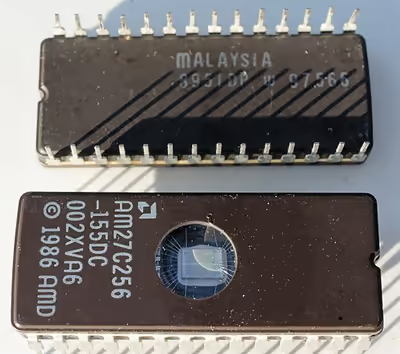
The original IBM PC BIOS (and cassette BASIC) was stored on mask-programmed read-only memory (ROM) chips in sockets on the motherboard. ROMs could be replaced, but not altered, by users. To allow for updates, many compatible computers used re-programmable BIOS memory devices such as EPROM, EEPROM and later flash memory (usually NOR flash) devices. According to Robert Braver, the president of the BIOS manufacturer Micro Firmware, Flash BIOS chips became common around 1995 because the electrically erasable PROM (EEPROM) chips are cheaper and easier to program than standard ultraviolet erasable PROM (EPROM) chips. Flash chips are programmed (and re-programmed) in-circuit, while EPROM chips need to be removed from the motherboard for re-programming. BIOS versions are upgraded to take advantage of newer versions of hardware and to correct bugs in previous revisions of BIOSes.
Beginning with the IBM AT, PCs supported a hardware clock settable through BIOS. It had a century bit which allowed for manually changing the century when the year 2000 happened. Most BIOS revisions created in 1995 and nearly all BIOS revisions in 1997 supported the year 2000 by setting the century bit automatically when the clock rolled past midnight, 31 December 1999.
The first flash chips were attached to the ISA bus. Starting in 1998, the BIOS flash moved to the LPC bus, following a new standard implementation known as "firmware hub" (FWH). In 2005, the BIOS flash memory moved to the SPI bus.
The size of the BIOS, and the capacity of the ROM, EEPROM, or other media it may be stored on, has increased over time as new features have been added to the code; BIOS versions now exist with sizes up to 32 megabytes. For contrast, the original IBM PC BIOS was contained in an 8 KB mask ROM. Some modern motherboards are including even bigger NAND flash memory ICs on board which are capable of storing whole compact operating systems, such as some Linux distributions. For example, some ASUS notebooks included Splashtop OS embedded into their NAND flash memory ICs. However, the idea of including an operating system along with BIOS in the ROM of a PC is not new; in the 1980s, Microsoft offered a ROM option for MS-DOS, and it was included in the ROMs of some PC clones such as the Tandy 1000 HX.
Another type of firmware chip was found on the IBM PC AT and early compatibles. In the AT, the keyboard interface was controlled by a microcontroller with its own programmable memory. On the IBM AT, that was a 40-pin socketed device, while some manufacturers used an EPROM version of this chip which resembled an EPROM. This controller was also assigned the A20 gate function to manage memory above the one-megabyte range; occasionally an upgrade of this "keyboard BIOS" was necessary to take advantage of software that could use upper memory.
The BIOS may contain components such as the Memory Reference Code (MRC), which is responsible for the memory initialization (e.g. SPD and memory timings initialization).
Modern BIOS includes Intel Management Engine or AMD Platform Security Processor firmware.
Vendors and products
IBM published full listings of the BIOSes for its original PC, PC XT, PC AT, and other contemporary PC models, in an appendix of the IBM PC Technical Reference Manual for each machine type. A benefit of the publication of the BIOS listings is that users could see exactly what the BIOS does and how it does it. However, those BIOSes were still copyright by IBM, so they could not be used by other manufacturers.
In March 1983, Compaq released its Compaq Portable, which included a clean-room engineered BIOS. This made Compaq became the first company that cloned an IBM PC successfully. However, Compaq did not offer their BIOS to other computer manufacturers.
In May 1984, Phoenix Software Associates released its first ROM-BIOS. This BIOS enabled OEMs to build essentially fully compatible clones without having to reverse-engineer the IBM PC BIOS themselves, as Compaq had done for the Portable; it also helped fuel the growth in the PC-compatibles industry and sales of non-IBM versions of DOS. The first American Megatrends (AMI) BIOS was released in 1986.
New standards grafted onto the BIOS are usually without complete public documentation or any BIOS listings. As a result, it is not as easy to learn the intimate details about the many non-IBM additions to BIOS as about the core BIOS services.
Many PC motherboard suppliers licensed the BIOS "core" and toolkit from a commercial third party, known as an "independent BIOS vendor" or IBV. The motherboard manufacturer then customized this BIOS to suit its own hardware. For this reason, updated BIOSes are normally obtained directly from the motherboard manufacturer. Major IBVs included American Megatrends (AMI), Insyde Software, Phoenix Technologies, and Byosoft. Microid Research and Award Software were acquired by Phoenix Technologies in 1998; Phoenix later phased out the Award brand name (although Award Software is still credited in AwardBIOS versions until 2001–2002, and AWRDACPI is still credited in Phoenix UEFI firmwares until late 2012). General Software, which was also acquired by Phoenix in 2007, sold BIOS for embedded systems based on Intel processors.
SeaBIOS is an open-source BIOS implementation.
Open-source BIOS replacements
The open-source community increased their effort to develop a replacement for proprietary BIOSes and their future incarnations with open-sourced counterparts. Open Firmware was an early attempt to make an open specification for boot firmware. It was initially endorsed by IEEE in its IEEE 1275-1994 standard but was withdrawn in 2005. Later examples include the OpenBIOS, coreboot and libreboot projects. AMD provided product specifications for some chipsets using coreboot, and Google is sponsoring the project. Motherboard manufacturer Tyan offers coreboot next to the standard BIOS with their Opteron line of motherboards.
Security
EEPROM and flash memory chips are advantageous because they can be easily updated by the user; it is customary for hardware manufacturers to issue BIOS updates to upgrade their products, improve compatibility and remove bugs. However, this advantage had the risk that an improperly executed or aborted BIOS update could render the computer or device unusable. To avoid these situations, more recent BIOSes use a "boot block"; a portion of the BIOS which runs first and must be updated separately. This code verifies if the rest of the BIOS is intact (using hash checksums or other methods) before transferring control to it. If the boot block detects any corruption in the main BIOS, it will typically warn the user that a recovery process must be initiated by booting from removable media (floppy, CD or USB flash drive) so the user can try flashing the BIOS again. Some motherboards have a backup BIOS (sometimes referred as DualBIOS) to recover from BIOS corruptions, and they use a special PLC to do BIOS recovery from BIOS corruptions.
There are at least five known viruses that attack the BIOS, two of which were for demonstration purposes. The first one found in the wild was Mebromi, targeting Chinese users.
The first BIOS virus was BIOS Meningitis, which instead of erasing BIOS chips it infected them. BIOS Meningitis was relatively harmless, compared to a virus like CIH.
The second BIOS virus was CIH, also known as the "Chernobyl Virus", which was able to erase flash ROM BIOS content on compatible chipsets. CIH appeared in mid-1998 and became active in April 1999. Often, infected computers could no longer boot, and people had to remove the flash ROM IC from the motherboard and reprogram it. CIH targeted the then-widespread Intel i430TX motherboard chipset and took advantage of the fact that the Windows 9x operating systems, also widespread at the time, allowed direct hardware access to all programs.
Modern systems are not vulnerable to CIH because of a variety of chipsets being used which are incompatible with the Intel i430TX chipset, and also other flash ROM IC types. There is also extra protection from accidental BIOS rewrites in the form of boot blocks which are protected from accidental overwrite or dual BIOS equipped systems which may, in the event of a crash, use a backup BIOS. Also, all modern operating systems such as FreeBSD, Linux, macOS, Windows NT-based Windows OS like Windows 2000, Windows XP and newer, do not allow user-mode programs to have direct hardware access using a hardware abstraction layer.
As a result, as of 2008, CIH has become essentially harmless, at worst causing annoyance by infecting executable files and triggering antivirus software. Other BIOS viruses remain possible, however; since most Windows home users without Windows Vista/7's UAC run all applications with administrative privileges, a modern CIH-like virus could in principle still gain access to hardware without first using an exploit. The operating system OpenBSD prevents all users from having this access and the grsecurity patch for the Linux kernel also prevents this direct hardware access by default, the difference being an attacker requiring a much more difficult kernel level exploit or reboot of the machine.
The third BIOS virus was a technique presented by John Heasman, principal security consultant for UK-based Next-Generation Security Software. In 2006, at the Black Hat Security Conference, he showed how to elevate privileges and read physical memory, using malicious procedures that replaced normal ACPI functions stored in flash memory.
The fourth BIOS virus was a technique called "Persistent BIOS infection." It appeared in 2009 at the CanSecWest Security Conference in Vancouver, and at the SyScan Security Conference in Singapore. Researchers Anibal Sacco and Alfredo Ortega, from Core Security Technologies, demonstrated how to insert malicious code into the decompression routines in the BIOS, allowing for nearly full control of the PC at start-up, even before the operating system is booted. The proof-of-concept does not exploit a flaw in the BIOS implementation, but only involves the normal BIOS flashing procedures. Thus, it requires physical access to the machine, or for the user to be root. Despite these requirements, Ortega underlined the profound implications of his and Sacco's discovery: "We can patch a driver to drop a fully working rootkit. We even have a little code that can remove or disable antivirus."
Mebromi is a trojan which targets computers with AwardBIOS, Microsoft Windows, and antivirus software from two Chinese companies: Rising Antivirus and Jiangmin KV Antivirus. Mebromi installs a rootkit which infects the Master boot record.
In a December 2013 interview with 60 Minutes, Deborah Plunkett, Information Assurance Director for the US National Security Agency claimed the NSA had uncovered and thwarted a possible BIOS attack by a foreign nation state, targeting the US financial system. The program cited anonymous sources alleging it was a Chinese plot. However follow-up articles in The Guardian, The Atlantic, Wired and The Register refuted the NSA's claims.
Newer Intel platforms have Intel Boot Guard (IBG) technology enabled, this technology will check the BIOS digital signature at startup, and the IBG public key is fused into the PCH. End users cannot disable this function.
Alternatives and successors
Unified Extensible Firmware Interface (UEFI) supplements the BIOS in many new machines. Initially written for the Intel Itanium architecture, UEFI is now available for x86 and Arm platforms; the specification development is driven by the Unified EFI Forum, an industry special interest group. EFI booting has been supported in only Microsoft Windows versions supporting GPT, the Linux kernel 2.6.1 and later, and macOS on Intel-based Macs. As of 2014, new PC hardware predominantly ships with UEFI firmware. The architecture of the rootkit safeguard can also prevent the system from running the user's own software changes, which makes UEFI controversial as a legacy BIOS replacement in the open hardware community. UEFI is required for devices shipping with Windows 8 and above. Likewise, Windows 11 requires UEFI to boot, with the exception of IoT Enterprise editions of Windows 11.
After the popularity of UEFI in 2010s, the older BIOS that supported BIOS interrupt calls was renamed to "legacy BIOS".
Other alternatives to the functionality of the "Legacy BIOS" in the x86 world include coreboot and libreboot.
Some servers and workstations use a platform-independent Open Firmware (IEEE-1275) based on the Forth programming language; it is included with Sun's SPARC computers, IBM's RS/6000 line, and other PowerPC systems such as the CHRP motherboards, along with the x86-based OLPC XO-1.
As of at least 2015, Apple has removed legacy BIOS support from the UEFI monitor in Intel-based Macs. As such, the BIOS utility no longer supports the legacy option, and prints "Legacy mode not supported on this system".
In 2017, Intel announced that it would remove legacy BIOS support by 2020. Since 2019, new Intel platform OEM PCs no longer support the legacy option.